
Available Now on iOS
Safe YouTube for your kids.
Algorithm-free YouTube for everyone.
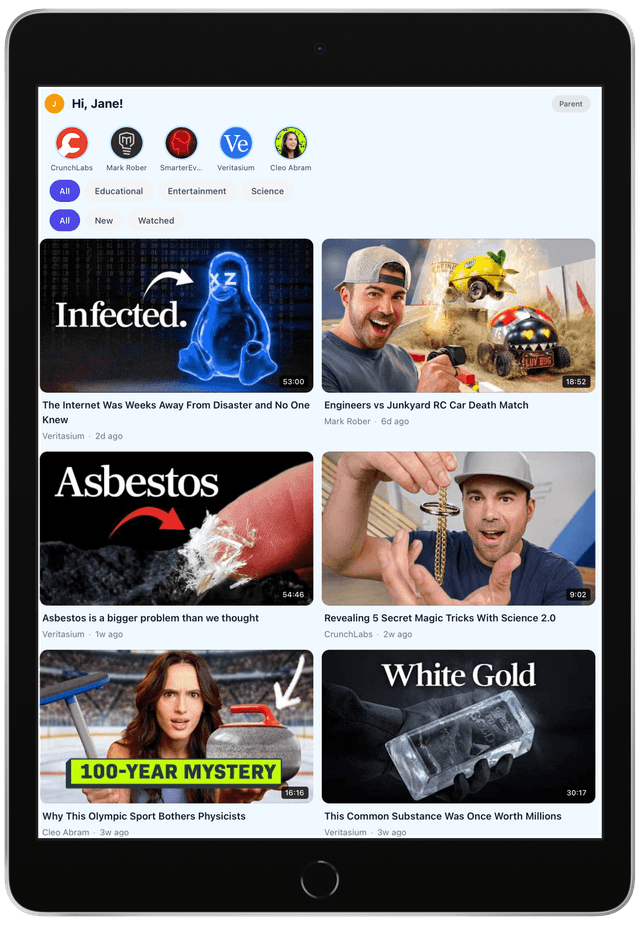
You choose the channels. They enjoy the videos. No algorithm, no ads, no surprises. NestTube gives parents full control over what kids watch on YouTube — and gives adults a calm, chronological feed without addictive recommendations.
Features
Everything parents need to take control
NestTube replaces YouTube with a safe, parent-controlled experience. No algorithm. No ads. No surprises.
- Channel WhitelistingYou decide exactly which YouTube channels your kids can watch. Nothing else appears in their feed.
- Channel Request FlowKids can request new channels. You review and approve with one tap from the parent dashboard.
- Category Time LimitsSet per-category time limits: 30 min Entertainment, 2 hours Education. Smarter than a single screen time cap.
- Starter PacksCurated bundles of age-appropriate channels to get you started instantly. One tap to add them all.
- No Ads, No TrackingVideos play through a private proxy. No YouTube ads, no tracking cookies, no data collection.
- Multi-Child ProfilesEach child gets their own profile with tailored whitelist and time limits. Switch between kids with a tap.
How It Works
Up and running in 4 simple steps
Getting started takes less than 5 minutes.
1. Block YouTube
Use Screen Time or your router to block the YouTube app and website. Kids can't access unfiltered content.
2. Install NestTube
Download NestTube from the App Store. Create your family account and set a parent PIN. Android coming soon.
3. Whitelist Channels
Search for and approve YouTube channels your kids can watch. Organize them into categories like Education, Entertainment, and Music.
4. Hand to Your Kids
Kids browse and watch only approved content. They can request new channels, and you approve or deny from the parent dashboard.
Compare
How NestTube stacks up
See why NestTube is the best choice for families who want real control over YouTube.
| Feature | NestTube | YouTube Kids | Restricted Mode | Blockers |
|---|---|---|---|---|
| Channel whitelisting | Full control | Limited | No | No |
| No algorithm | Yes | No | No | N/A |
| No ads | Yes | Has ads | Has ads | N/A |
| Category time limits | Yes | Total only | No | Total only |
| Channel request flow | Yes | No | No | No |
| Activity monitoring | Yes | Limited | No | No |
| Multi-child profiles | Yes | Yes | No | No |
| Solo mode for adults | Yes | No | No | No |
Solo Mode
Not a parent? NestTube is for you too.
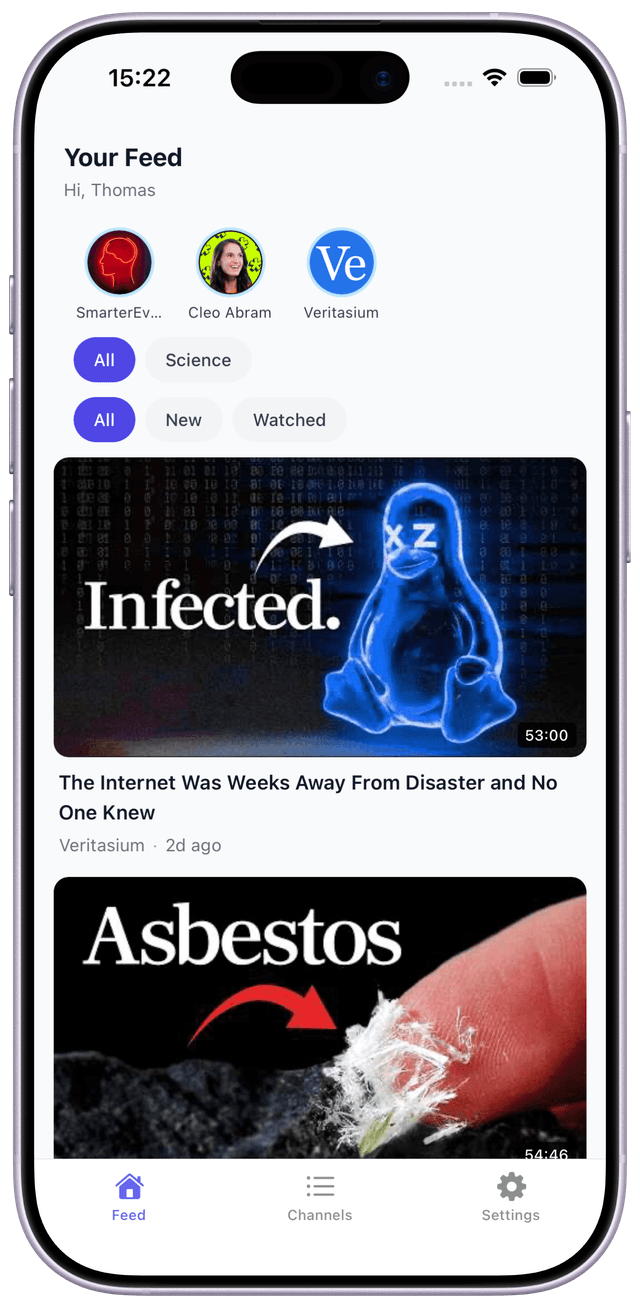
Tired of YouTube's algorithm deciding what you watch? Solo Mode gives you a clean, chronological feed from channels you follow. No recommendations. No rabbit holes. Just the content you chose.
What Parents Say
Families love NestTube
Real feedback from parents who use NestTube to keep their kids safe on YouTube.
"Finally, I can hand my kids the iPad without worrying about what they'll find. NestTube gives me total control without being complicated."
SM
Sarah M.
Parent of 3, ages 5-11
"My son used to fall down YouTube rabbit holes for hours. Now he watches channels I've approved, and the category time limits keep screen time balanced."
JR
James R.
Parent of 1, age 8
"I use Solo Mode for myself — no recommendations, just the cooking and tech channels I follow. It's YouTube without the noise."
PK
Priya K.
Solo Mode user & parent
Blog
Tips for keeping kids safe on YouTube
Guides, comparisons, and advice from the NestTube team.

FAQ
Frequently asked questions
Everything you need to know about NestTube.
Get NestTube
Download for iOS or join the Android waitlist
Available now on iOS
Download NestTube for iPhone and iPad from the App Store.

Android coming soon
Join the waitlist to be notified when NestTube launches on Android.
Join Android Waitlist